Sep 28, 2026Buying Guides
Calculator Pencil Cases: A Buyer’s Display and Accessory Sample Check
Test the calculator display, keypad, accessory fit and packed handling before approving a multifunction pencil case for a school or retail order.
The calculator lights up in a sample meeting, the keys work twice, and everyone moves on to colors and packaging. Months later, the buyer may discover the questions that the first meeting missed. Is the display readable in an ordinary classroom? Can the retail insert press a key? Is the calculator fixed, removable or able to rattle inside the case?
A calculator pencil case combines storage with a functional electronic accessory. The buyer needs to approve the two parts together. A correct calculation on one sample is only the beginning.
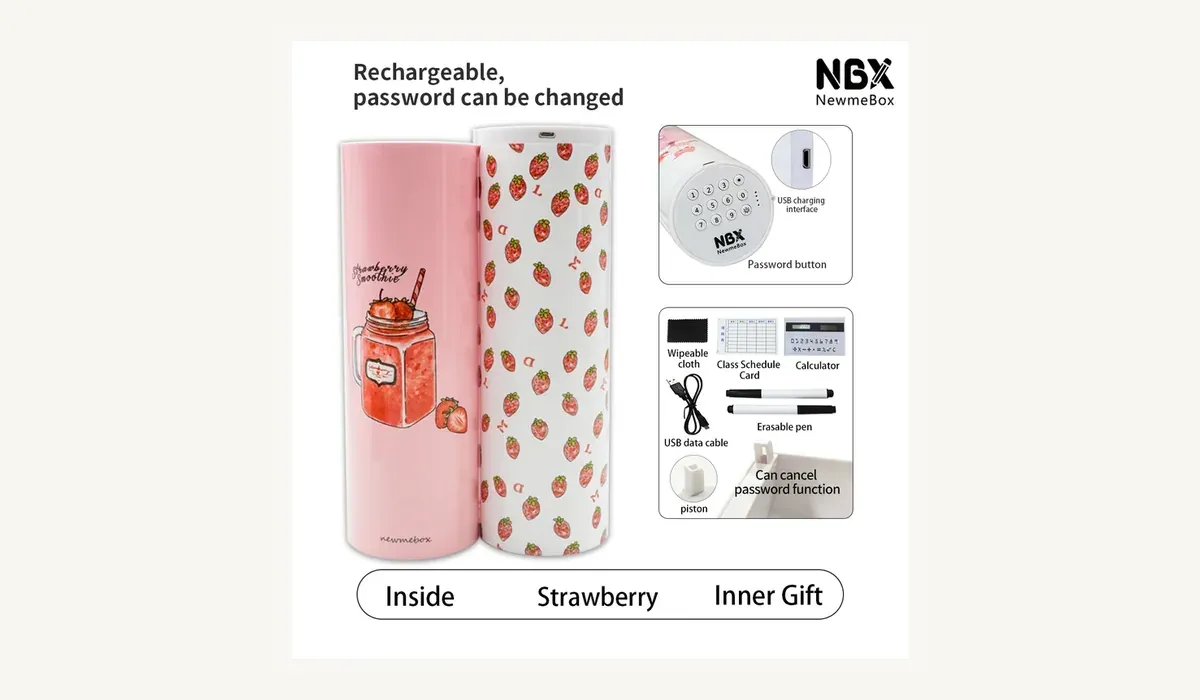
The NBX customization material identifies one regular long multifunction pencil case as ABS plastic, measuring 21 × 6.5 × 6.5 cm and weighing 235 g, with 50 pieces per carton. It describes double-sided opening, a magnetic closure, a built-in solar calculator, mirror, erasable whiteboard and timetable. Another NBX electronic password-lock model uses the same listed size and carton count, with a rechargeable lock and a solar calculator among its functions.
Those details show why the exact configuration matters. “Pencil case with calculator” does not define how the calculator attaches, how it receives power or which accessories ship with it.
Freeze the calculator configuration first
Ask the supplier to identify the exact calculator used in the sample. Photograph the front, back, display, keys and attachment area. Record whether the component is built in or detachable. If it can be removed, note how it locks into position and which orientation the customer should use.
The word “solar” also needs clarification. It may describe one power source without answering whether the calculator uses an additional cell or another power arrangement. Ask the supplier to state the power architecture and the documents available for the electronic component. If your product also has a rechargeable electronic lock, keep the lock power specification separate from the calculator specification.
Before approving artwork, confirm that a logo, sticker or printed insert will not cover the light-receiving area, display or key labels. A digital mock-up may look correct while ignoring the space needed to operate the calculator.
Test display readability in the real channel
Check the sample under the lighting where people will actually use or buy it. That may include a classroom, a home desk, an office and the intended retail shelf. Do not rely on a supplier studio with bright lights.
Enter the same short calculation on each sample and compare the display. Look for missing or faint segments, uneven contrast, reflections from the case and an angle that forces the user to lift or twist the product. If the calculator can be detached, repeat the check both inside and outside the case.
Record the lighting location and the result rather than writing “display OK.” A simple photo or short video from the user’s viewpoint makes the approval easier to repeat.
If the display becomes difficult to read under expected conditions, pause. Do not invent a minimum light threshold. Ask the supplier or a qualified test partner how to define a relevant requirement for the exact calculator and destination market.
Give every key a repeatable check
Visual inspection cannot confirm keypad performance. Prepare a small test sequence that uses every number and each operation key present on the approved model. Use calculations with known results so the inspector can distinguish an input problem from a math mistake.
Watch for:
- a key that needs more pressure than the others;
- missed digits or two entries from one ordinary press;
- labels that are hard to read after the calculator is installed;
- a key that rubs the case or retail insert;
- a display that does not clear or return as expected.
Run the same sequence across several samples. The purpose is not to claim a lifetime or cycle count. It is to find obvious variation before the trial order and create a functional check that another inspector can repeat.
For a model with an electronic code lock, use a different test record for the password keys. Calculator accuracy and lock access are separate acceptance points even when both appear on the same product.
Approve the full accessory set
The NBX multifunction case material lists a mirror, erasable whiteboard and timetable together with the calculator. Confirm the exact included set for your order. Model names and catalogue images can change, so a written bill of contents protects both the buyer and supplier.
Open both sides, load the case with ordinary stationery and check each accessory in its installed position. The calculator should remain stable while keys are pressed. The mirror and whiteboard should not rub the display, block the closure or move into the storage area. If markers, cloths, cards or cables are included, count them and define where they sit inside the retail pack.
This is also a trade-off decision. More functions can make a product memorable, but every extra component adds an approval point and a possible replacement question. A retailer seeking a simple price point may prefer fewer accessories. A gift programme may value the complete set if the packaging explains it clearly.
Recheck after packing and transport
Place the approved accessory set into the proposed retail packaging. Close the pack and inspect whether any insert presses the calculator keys, display or solar area. Shake only as normal handling requires and listen for a loose component. Then use a transport evaluation suitable for the route and risk level.
After the packed test, repeat the display and keypad sequence. Check attachment, scratches, loose parts, accessory count and case closure. Compare the result with the original photos.
Pause approval if the calculator shifts, if pack pressure holds a key down, if the display shows new marks, or if the same calculation gives inconsistent input across samples. Also pause when the sample contains accessories that the quotation does not list.
A quote request that prevents assumptions
Send Aura Craft World and NBX the following information:
- destination country and sales channel;
- selected pencil-case model or reference images;
- trial and expected repeat quantities;
- calculator attachment and power requirements;
- required lock type, if any;
- exact mirror, whiteboard, timetable and accessory list;
- colors, pattern, logo position and retail packaging;
- target-market documents or tests;
- sample approval deadline and launch date.
Dongguan Xingbo Stationery Co., Ltd. develops and supplies OEM and ODM stationery from Dongguan, China. With a clear configuration, the team can confirm which functions match an existing product and which details need a revised sample or additional documentation.
Review the NBX Electronic Code Lock Pencil Case and the NBX Quicksand Password Pencil Case. For the wider approval file, use our quality-control checklist, packaging guide and password pencil case sourcing guide.
Send the calculator format, target market, quantity, accessory list, packaging and timing. We will reply with the points we can confirm and the questions that still need a sample decision.